Edge River Method Part 2 of ???: Box Pleating
In part 1, I discussed ERM in general, but now it’s time to go into a specific application: box pleating, and specifically the case where the abstraction is made of well-behaved rectangles, which I will call orthogonal box-pleated ERM. (All cases handled by Soichiro Uchida’s Orixa fall into this case.)
First of all, since we’re box pleating, we’re not going to be using ideal ERM maps anymore. All rivers must turn 90° at a time, except when shifted by a Pythagorean stretch.
River Directions
Let’s revisit an ERM map from the previous post:
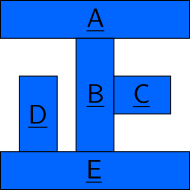
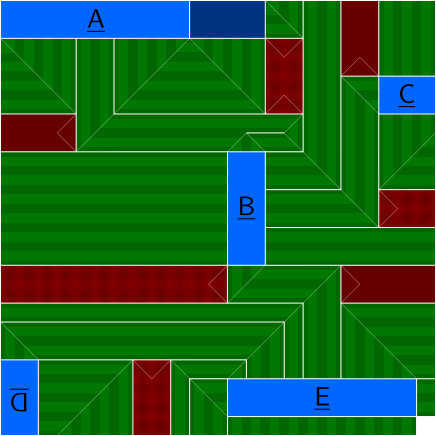
Note that all rivers collapse to either a horizontal line or a vertical line1 in the abstraction, because we’re in orthogonal box-pleated ERM. We can thus color-code the rivers. There’s actually two ways to color-code the rivers2. We can color-code rivers by target edge direction, or we can color-code rivers by flow direction. In 2D, this distinction doesn’t matter (you just switch the colors), but in 3D, it’s a very important distinction. We will call a river that collapses to a horizontal line a horizontal river or an X-axis river and a river that collapses to a vertical line a vertical river or a Y-axis river. We can also name rivers by flow direction, e.g. horizontally-flowing river / X-flowing river and vertically-flowing river / Y-flowing river.
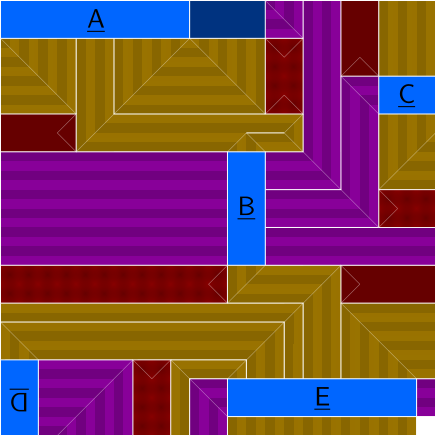
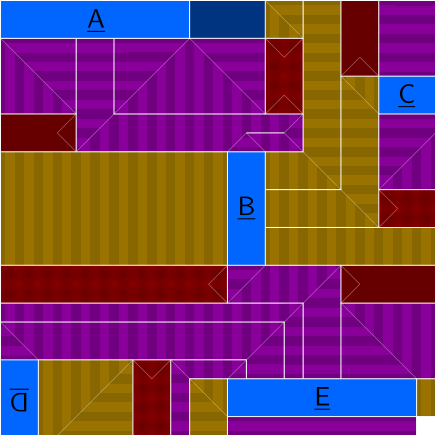
Specifically, in the graphic on the left, yellow rivers are horizontal rivers and purple rivers are vertical rivers. By the way, in the case of a 3D abstraction (that’s still orthogonal), you end up with 3 different directions:
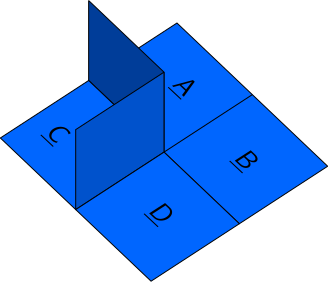
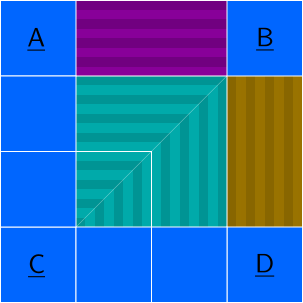
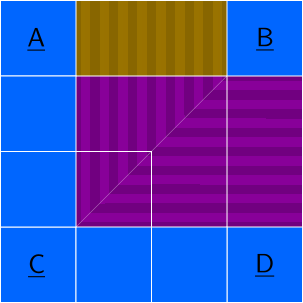
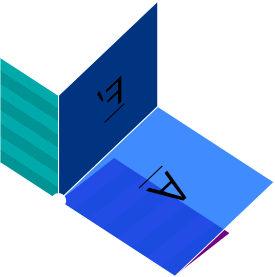
To avoid confusion, we won’t call the cyan river a vertical river (that’s a Y-axis river). We’ll just call it a Z-axis river. By the way, this particular ERM map doesn’t work, but we’ll see why later in the 3D section.
Separating rivers by direction makes some things clearer and easier to see, which we’ll get into later. For now, let’s review the ERM design process:
- Come up with an abstraction. Keep in mind that waffle walls are inevitable if there’s an internal point that must be winded more than 360° around.
- Pack the abstraction into a map, forming lakes.
- Send a river from each lake edge and make sure it goes to the sea (paper boundary) or to a lake edge that will end up in the same place.
- If two rivers form a concavity, make sure there’s space between them. Use a peninsula as a reminder.
- If two rivers form a convexity, they can intersect as long as distance constraints are still satisfied. If they cross, beware the river mapping!
- Calculate the lakes for river overlaps.
- Draw a crease pattern.
- Profit!
We will now go through the steps in detail and see how they apply to box pleating. But note that you don’t just follow these steps in order. When checking rivers for concavities, you may notice that you’ve accidentally created an impossible situation, and then you need to go back to lake packing to fix it. Or when you go to draw a crease pattern, you may notice that you can’t resolve a diagonal hinge without it bumping into a lake, and then realize it’s because you forgot to add space between concavity-forming rivers, so you need to go back to river packing3.
Making the Abstraction
The first step is coming up with an abstraction. Because we’re in orthogonal box-pleated ERM, the abstraction must consist entirely of positive-integer-dimensions axis-aligned rectangles. (You can introduce diagonal lines as long as they separate lakes and the end result is that all exposed lake edges are grid-aligned.) The abstraction must be a tree (if there are holes, you need to add slits) To avoid the need for waffle walls, you need to make sure that at no point is it required to wind more than 360° around a vertex in a closed loop. This can be fixed by adding a slit or by dealing with the waffle walls.
Here are some good abstractions:

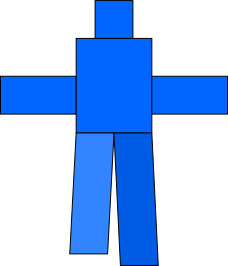
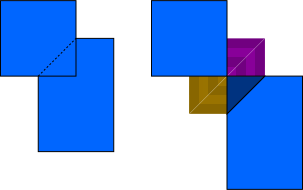
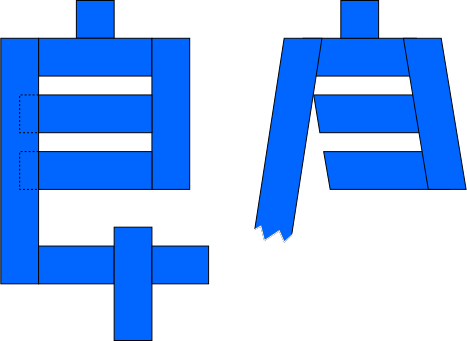
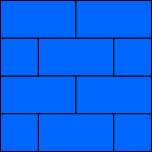
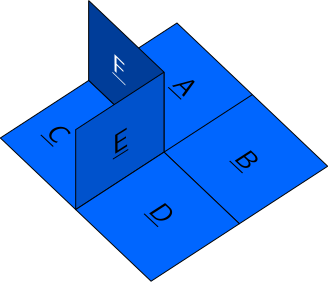
Here are some sketchy abstractions. You can use a sketchy abstraction if you know what you’re doing, but they’re not recommended for orthogonal box-pleated ERM.
Packing the Lakes
Once we have a nice abstraction, we need to pack the lakes onto a box-pleated grid. If we want axial creases to stay on the grid, an important rule to follow is the parity rule for box pleating: the taxicab distance (horizontal distance + vertical distance) between any two paper points that map to the same abstraction point is even. This is because pleats have integer width, so they shift paper by an even width. If you want to shift paper by an odd width, you need a half-integer wide pleat.

Sending the Rivers
Next up is sending a river from each lake edge that either goes to the sea or goes to a lake edge that ends up in the same place. We’re in box pleating, so box pleating rules should be followed here. That means 90° turns only, except at Pythagorean stretches.
One thing special about box pleating is that since all river directions are parallel or perpendicular to each other, you don’t have to think about backside lake placement as much, and you can simply send a river from a terminating lake edge (one that’s not supposed to connect to another lake) to the terminating lake edge on the opposite side (and a backside lake will magically appear).
To illustrate this, we will draw a blockade map, which is a map where no rivers are allowed to go to the sea4.
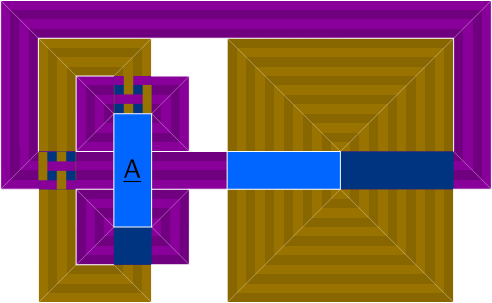
Notice that a river seems to flow from (terminating) segment $\overline{PQ}$ to segment $\overline{RS}$ on the other side, and that one seems to flow from segment $\overline{TU}$ to segment $\overline{VW}$ on the other side (it doesn’t flow to $\overline{XY}$ because that’s not a terminating segment.) Remember that in actuality, they flow into backside lakes, which then send new rivers that flow to the other side. Every river intersection in the above diagram is a backside lake. But the cool thing is that we didn’t need to know where these backside lakes should be in advance5!
Remember that when you cross rivers like this, you must remember that correspondences change. You cannot, in particular, have the purple belt on the left go through river $\overline{XY}$ to try to save space.
And if a river goes into the sea but needs to come back and meet an edge on the paper, and you’re not sure what constraints it has about coming back, draw a blockade map to help.
Spacing the Concavities
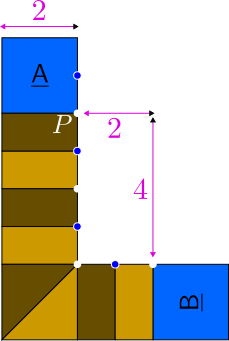
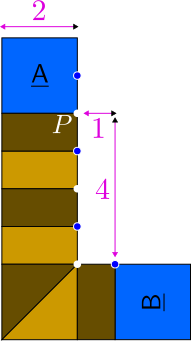
Now for a very important part of ERM: making sure that rivers that form a concavity have a peninsula between them. Let’s analyze the box-pleating case. Recall that in box-pleating, the minimum pleat width is 1 unit, and the distance between rivers is usually6 an integer. Since we know from part 1 that rivers forming a concavity aren’t allowed to touch, the smallest distance between concavity-forming rivers is 1 unit. And in fact, 1 unit is enough:
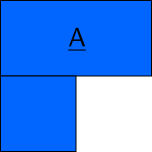
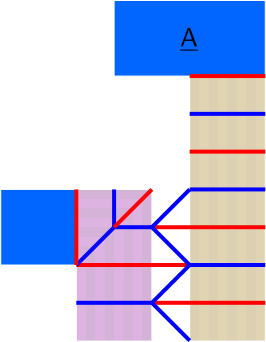
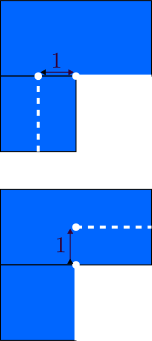
One caveat that you can see above is that because of the parity rule, if rivers alternate mountain and valley with width-1 pleats, rivers separated by an odd distance will have their MV assignments misaligned, requiring a long reverse fold, which ends up acting like a spring when folded, for better or worse. If you want to avoid those, you need to use some other MV pattern or separate all rivers by even distances, and in the case of concavity-forming rivers, since they can’t be separated by 0, they must be separated by at least 2.
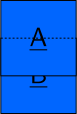
Now, this rule is just for a 90° concavity. For a 180° concavity (i.e. a slit), you may think you can do the same thing as for a 90° concavity:
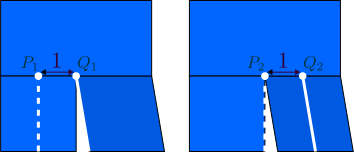
However, watch what happens when we compare $P_1$ to $Q_2$:
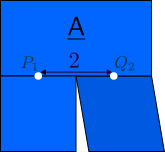
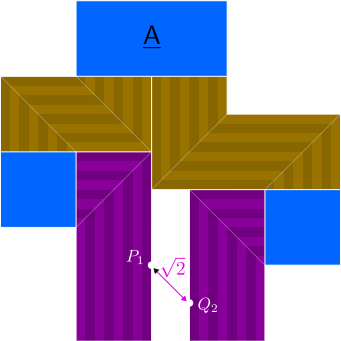
Those two points get farther apart, which is not allowed! If you don’t want to use partials, then a 180° concavity must be treated like two 90° concavities in a row, and the rivers must be separated by at least 2. On that note, we introduce the concept of the width-0 river, which flows between the two 90° concavities that a 180° concavity must be treated as.
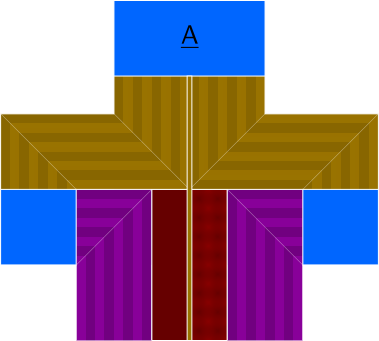
In general, a $k\cdot 90^\circ$ concavity needs its rivers to be separated by at least $k$ units (if you don’t want to use partials), and have $k - 1$ width-0 rivers in between.
Before we move on to the next step, I should mention that there is a situation where 90°-concavity-forming rivers are allowed to touch, which is specifically if they do so only at a vertex, and they (preferably) both have even parity at that vertex (that is, the length of the source of the relevant river bank to the intersection vertex is even. If the rivers both have odd parity at that vertex, you need a local partial.7 If the rivers have different parities at that vertex, you messed up lake placement.).
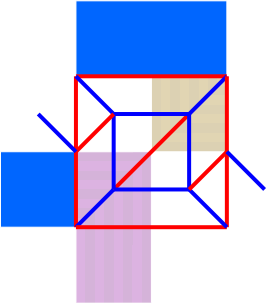
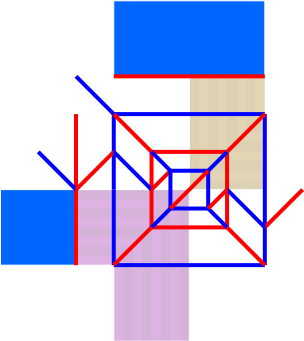
The local partial there effectively turns the odd-parity intersection into an even-parity intersection. It’s just that the pleat width stops being uniform.
Because of how the situation looks like, we can use width-0 rivers to show that rivers forming concavities more than 90° cannot touch at all.
Overlapping the Convexities
“Spacing the concavities” is perhaps the easiest step to forget, but it’s pretty simple to understand how to do it properly. Split concavities into 90° concavities with width-0 rivers. Rivers forming a concavity must be spaced at least 1 unit apart, except when touching at a corner. Done.
However, overlaps are more complicated and finicky, and even while in the middle of writing this documentation, I ran into several edge cases. So we will try our best.
There are two major types of overlaps: crossing overlaps (ones where the rivers cross completely) and hugging overlaps (ones where the rivers hug each other, but don’t cross). Regardless of type, remember that overlaps tend to force lakes to appear, and thus should occur on even parity to avoid partials (and those partials will probably not be local this time, so be careful!)
Crossing Overlaps
We’ll focus on one specific type of crossing overlap: the perpendicular cross, which is the overlap formed by two rivers crossing each other without turning at the overlap. We’ve already seen some perpendicular crosses in the Sending the Rivers section in the blockade map. In fact, they are the only potentially8 required type of overlap in a blockade map. All other overlaps are there just to save space.
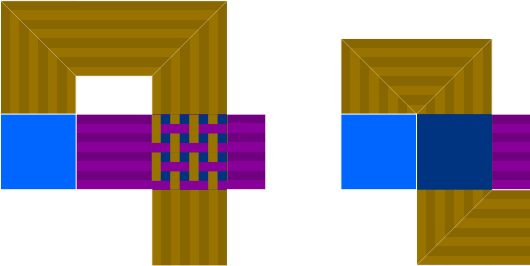
You may know from the last post that when rivers overlap in the ideal (infinitely dense creases) ERM model, no creases can be drawn except where both rivers agree on the turn direction. In the case of the perpendicular cross, the rivers never agree, and the entire rectangle becomes a lake. This is still true in box pleating. The rectangle of the perpendicular cross is a lake, for all the consequences that comes with.
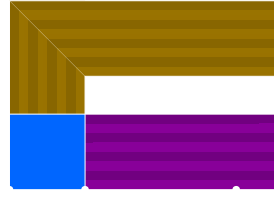
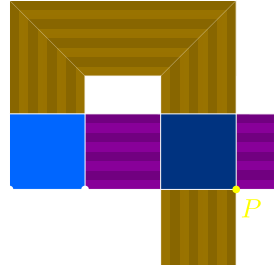
This, in particular, means that you cannot cross a (positive-width) river through a river that already connects two edges that go to the same place, unless you then proceed to cross it back.
I’m not aware of any valid crossing overlaps that aren’t the perpendicular cross, so let’s move on to the more complicated type:
Hugging Overlaps
In a hugging overlap, two rivers hug each other, and then separate. In ideal ERM, the far banks of the rivers (the ones not intersecting) can’t get closer to each other than their corresponding points are in the final model. In other words, the minimum width of the hugging overlap (the hug width) must not be shorter than the final distance between the two points that the far banks correspond to. The box pleating condition is more complicated, and I still don’t quite know it, but this rule is a good starting point.
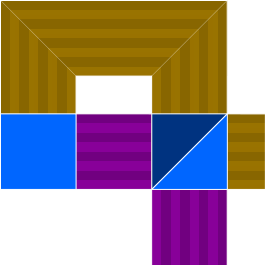
The simplest hugging overlap is the perpendicular hug, where two rivers hug and then immediately turn 90° away from each other, as in the example on the left. This forces the following lakes if the rivers have the same width and hug as close as possible (which we will call a complete perpendicular hug):
A perpendicular hug that is not complete (either the rivers don’t hug as close as possible, or they’re not even the same width), can be filled in similarly, but it is not forced. Let’s take a look at an incomplete perpendicular hug and the ways it can be turned into lakes.
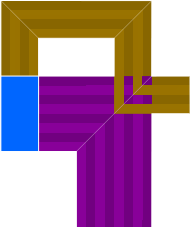
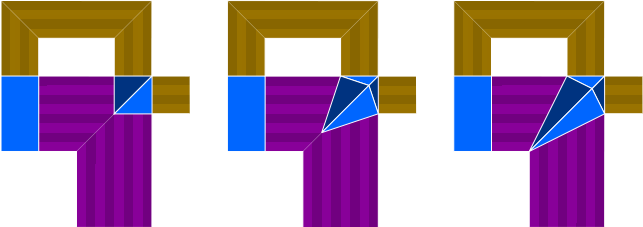
Of course, there’s no reason to use any of them other than the one on the left, which is the simplest one.
The other type we’ll talk about is the parallel hug, where two rivers hug each other for a distance and then separate away. These tend to require awkward diagonal lines to fill in. And because these overlaps can actually last a while, and since the rivers end up agreeing everywhere on where the creases should go, perhaps the standard strategy of replacing overlapping rivers with lakes isn’t the best idea for showing river flow:
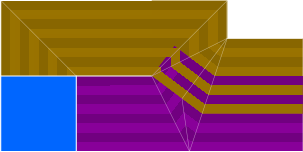
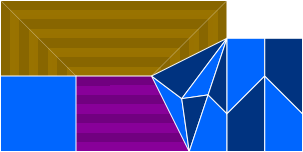
We would like to instead treat this like a river of length 3, but we can’t, because it’s composed of two rivers that flow in different directions (flow direction, not target direction, though this only matters in 3D). You usually don’t have a diagonal hinge cutting through the heart of a river like that. So we’ll just revert back to overlapping river notation for the parallel part of the overlap:
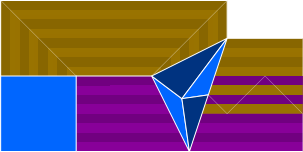
One caveat about this particular example is that the rivers are separated by -1, which is an odd number, so expect that diagonal hinge to instead be a long reverse fold if you fill rivers with alternating mountain and valley. It’s like the shadow version of rivers separated by 1 to secure a concavity. Of course, you can make parallel hugs with even thicker overlaps as long as the hug width doesn’t decrease too much.
For hugging overlaps, I’m pretty sure I know the distance rule10, so let’s discuss that. Behold, the hug width rule for parallel hugs:
Let $h$ be the hug width, and $d$ be the distance between the points that the far banks correspond to in the final model.
- If the rivers are separated by an odd amount, then $\sqrt{h^2 + 1} \ge d$.
- If the rivers are separated by an even amount, then $h \ge d$.
To see why, let’s look at the correspondences for the far banks in both cases:

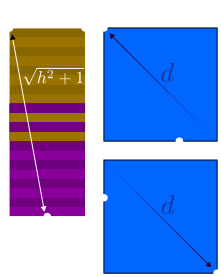
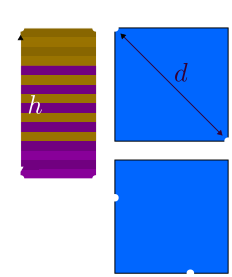
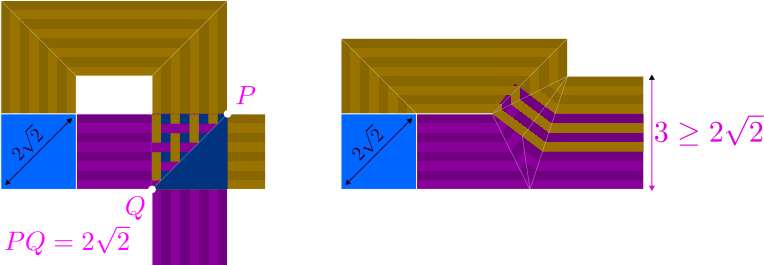
Because of the offset caused by separating the rivers by an odd distance, the far banks don’t reach their extreme points at the same time, so there’s a little extra lenience there. This can cause a paradox where scaling a valid box-pleated ERM map by a factor of 2 or more can make it invalid. Let’s look at the smallest case of a parallel hug: a width-1 river overlapping a width-1 river, which is valid because the distance separation is -1 and $\sqrt{1^2 + 1} \ge \sqrt{2}$.
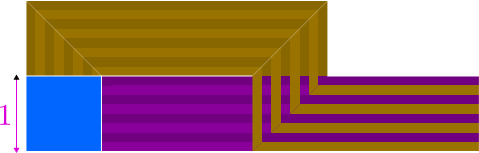
Now let’s calculate the lakes. There’s actually an entire forced square due to how the correspondences work out.
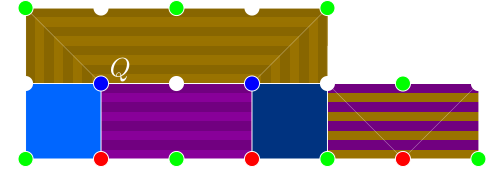
And you can even draw a crease pattern for it. But that’s an exercise for after you read Drawing the Creases. Now let’s try to scale this by a factor of 2.
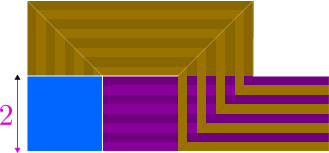
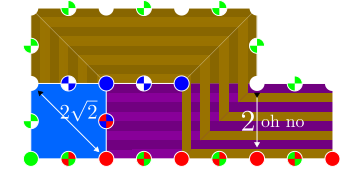
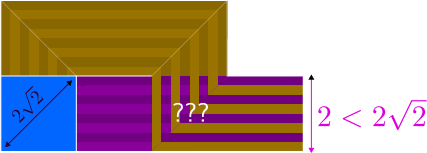
This kills the validity of the ERM map. The hug width rule now states that $2 \ge 2\sqrt{2}$, which is false. This particular parallel hug is only valid if not scaled at all, since even for odd scale factors $2k+1$, we need $\sqrt{(2k+1)^2 + 1} \ge (2k+1)\sqrt{2} = \sqrt{(2k+1)^2 + (2k+1)^2}$, which is only true if $2k+1 = 1$. If you for some reason want to be able to scale the ERM map, you should always follow the even-separation case of the hug width rule, even if the rivers are separated by an odd amount, since the even-separation case is robust against scaling. For the fun of it, here’s a list of some small cases that trigger the paradox (cases that satisfy the odd-separation case but not the even-separation case):
| Separation | Width Pairs |
|---|---|
| -1 | (literally any river width, 1) |
| -3 | (5, 5), (7, 4) |
| -5 | (9, 8), (11, 7), (17, 6) |
| -7 | (13, 11), (15, 10), (19, 9), (31, 8) |
Let’s take a look at a valid separation by -2, since those can get wonky. The example we’ll use is a scaled-up version of an already seen example, but this time the scaling is valid since that example already followed the even-separation case of the hug width rule (though it only needed to follow the odd-separation case).
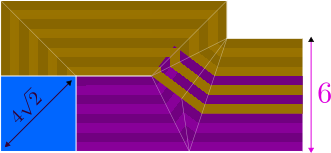
Now let’s fill it with lakes. There’s a tiny bit of slack, so there’s multiple ways to do this. Unfortunately, you don’t get a nice 45° diagonal line because that only works for separation -1.
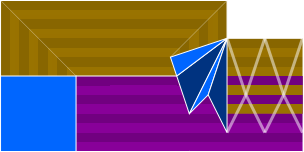
The bad news is that you have awkward diagonal creases on the parallel part. The good news is that those diagonal creases don’t need to be reverse folds since the separation is even. Anyway, as a fun fact, we learned that the smallest (by hug width) case of a parallel hug is width-1 hugging width-1 with separation -1, but that takes advantage of the slack offerend by the odd-separation case of the hug width rule. The smallest case that follows the even-separation case is width-2 hugging width-2 with separation -1. The smallest case with even separation is width-4 hugging width-3 with separation -2.
So yeah, overlapping the convexities. Perpendicular crosses are sometimes required, and all other overlaps are just to save space. And overlaps tend to turn into lakes, with all that comes with.
Calculating the Lakes
We touched quite a bit on this step in the previous section, but here, you take those overlaps, turn them into lakes, and deal with the consequences. As a review:
- Perpendicular cross: turns into a rectangle-shaped lake.
- Perpendicular hug (complete or incomplete): turns into a couple of right-isosceles-triangle-shaped lakes. Incomplete ones have other patterns; don’t use them.
- Parallel hug: requires a weird Pythagorean shift (unless it’s separation -1), and spits out some number of diagonal hinges that the other side of the overlap eats up.
Drawing the Creases
Now it’s time for the fun part. You take the ERM map that you’ve worked so hard on and figure out why in the world the creases aren’t lining up right. And you then realize that you’ve ignored parity when placing a lake. Or when overlapping rivers. Or you forgot to separate concavity-forming rivers. Or you created this nice beautiful overlap, but because it happens too close to a hidden edge of a lake, it technically breaks the paper distance rule. And you have to go back, fix your ERM map, and even realize that it’s just impossible with the current grid size. Oh well. But you won’t realize any of that until you actually draw some creases.
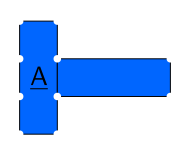
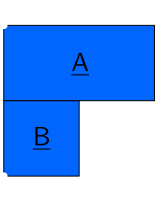
Before we draw creases, we need to select certain lake edges to be hidden. Let’s say we want to make a nice cute concave Γ, and we’ve made a nice ERM map for it:
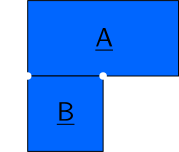
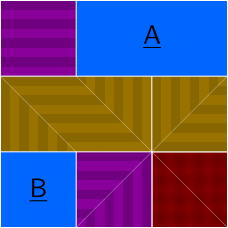
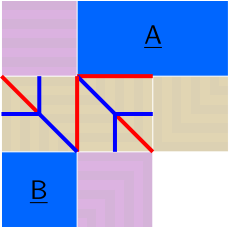
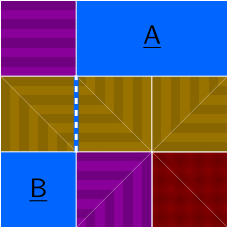
Now let’s try to draw a crease pattern on river $\overline{PQ}$, alternating mountain and valley. Of course, we want the boundaries of the lakes to be exact, so we’ll put mountain creases on them11.
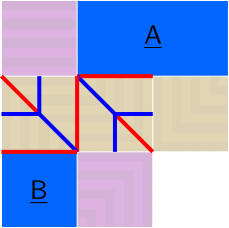
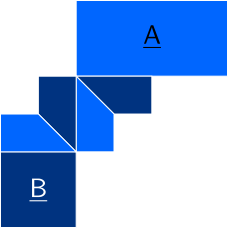
Unfortunately, as you can see in the second image above, if you try to do that, the reflections don’t match up and $\f{B}$ becomes a backside lake! But this problem can be fixed if we delete a reflection line, and we can, for example, delete the reflection line on $\f{B}$, meaning that $\f{B}$ goes under $\f{A}$. We call the lake edge that that reflection line was on a hidden edge.
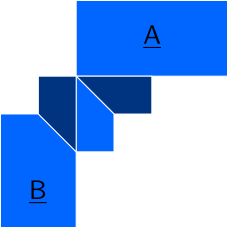
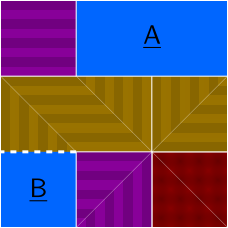
As an aside, if we really didn’t want $\f{B}$ to just go under $\f{A}$, there’s another thing we could do: add a width-0 lake, and extend width-0 rivers from it.
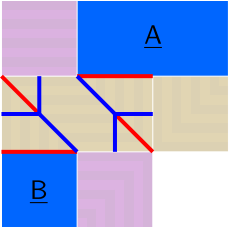
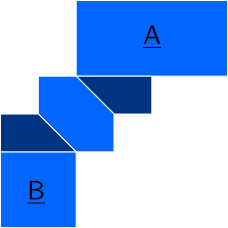
We could also try removing the crease on $\f{A}$ instead, but the (vertical) width-0 river extending from the right of the resulting width-0 lake runs directly and immediately into the horizontal river on the right that it forms a concavity with. But also more obviously, $\f{A}$ just straight up becomes concave, which is a big no-no.
Anyway, let’s go back to the solution where an edge in $\f{B}$ becomes a hidden edge. Once we’ve marked the hidden edges, another good thing to do is to fill in lands (including peninsulas; they’re lands too) with belts. Or just rivers that go off the edge of the paper, as in this case.
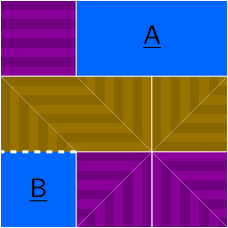
Note that you should mind what edge these new rivers map to. In this case (and for peninsulas in general), the shading on that new vertical river suggests that it combines with the vertical river coming from $\f{B}$ to form one giant length-4 river. If it was a reflection of that river instead, it would map to the same edge as that river maps to, which would cause concavity-forming rivers to touch.
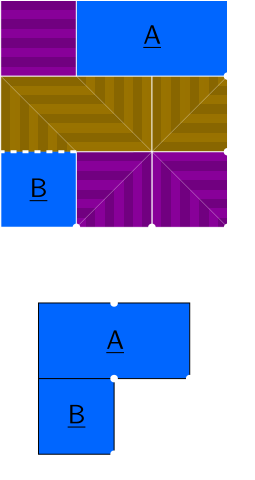
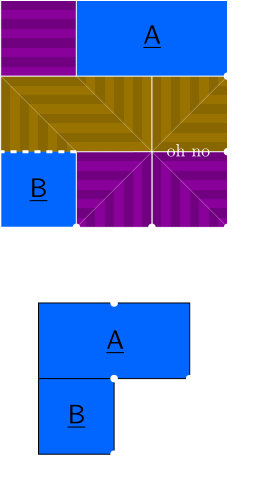
The next step is to draw ridge creases and evenly spaced axial creases along the rivers. I suggest alternating them mountain and valley, starting with a mountain at the lake (except if that edge is a hidden edge, in which case you start with a valley 1 unit away from the edge), though there are times you can get away with not doing that.
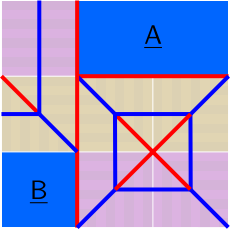
Finally comes the hardest part, and the moment of truth: resolving the hinges. This is where things break. This is where you realize you goofed on the ERM map (but not in this example!). Basically, you find incomplete vertices and finish them off, making sure to not draw creases on lakes. A good rule is that there should be a diagonal hinge at each edge where two rivers flowing in different directions touch (again, flow direction here), so that in the final model, a 90° angle is properly formed. Sometimes, creases end up being deleted. (You can think of that as creases being added that cancel out creases that already exist.)
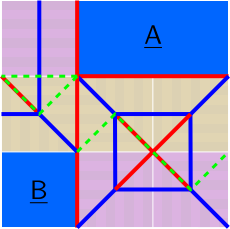
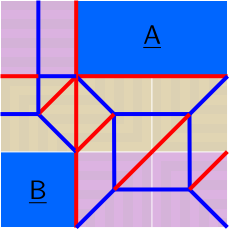
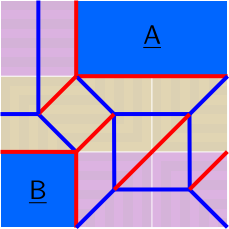
Now, this process gets weird if rivers are separated by an odd amount. Let’s make a Γ with a longer top side.
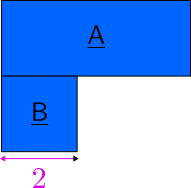
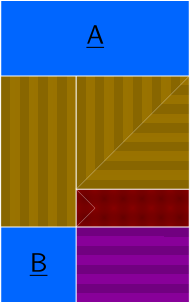
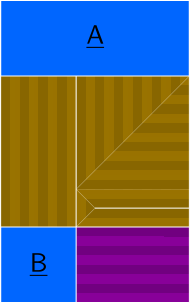
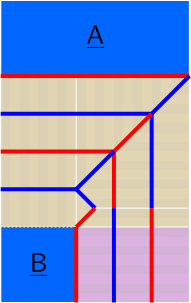
Yep, things get weird here, and trying to just finish off incomplete vertices with hinges will get you into a mess. Here’s the proper way to handle this case:
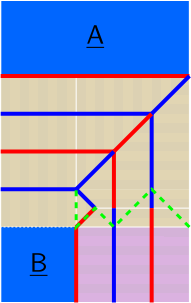
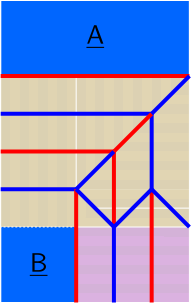
The threatened partial is magically resolved with a reverse fold! In the case of rivers separated by 1 to secure a concavity, if you alternate mountain and valley on the rivers, that reverse fold is specifically a valley. You can use this fact to predict the direction of the reverse fold. There’s also the shadow version of this: in the case of rivers separated by -1 due to a parallel hug, there’s a mountain reverse fold.
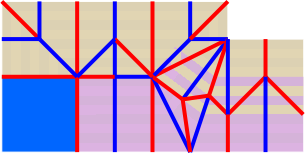
Problems
Problems can arise when you’re trying to resolve hinges. Sometimes, like the above example of Γ with a long top edge, it’s just because there’s rivers separated by an odd number of units, making the hinge resolution trickier. But sometimes, there’s an actual problem with the ERM map.
Sometimes you can have threatened partials that don’t resolve, in which case, check your lake position parity. If it’s wrong, you gotta go all the way back to Packing the Lakes.
Sometimes you might have a hinge that seems to have nowhere to go other than directly through a lake. In that case, make sure you’re separating your concavity-forming rivers, as this is a common symptom of not doing so. If you didn’t, you have to go back to Spacing the Concavities.
Sometimes you might have a hinge that seems to have nowhere to go other than on top of a hidden edge. In this case, it’s probably because you’re overlapping rivers in such a way that the lakes that they form stretch the paper under the assumption that the hidden edge is a hidden edge. This is a more interesting problem, so let’s analyze a case:
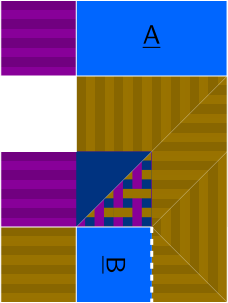
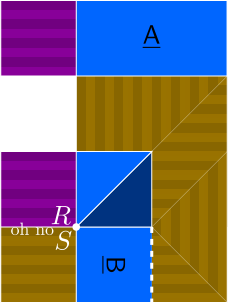
Here, we try to use an overlap that’s valid in isolation. Without hidden edges, the marked point in the diagram on the right would just map to $S$ and that would be that. However, because of the hidden edge, the forced lakes want to make a nice 180° turn and get attached to the hidden edge on $\f{B}$, which means that from the forced lakes’ point of view, the point maps to $R$, but from $\f{B}$’s point of view, the point maps to $S$. Thus, a distance of 0 gets stretched to a distance of 4, which is not allowed. If we want to use this specific overlap with this specific rotation of lakes, we need to separate that overlap by 4. In general, be careful about overlapping a river that comes from a hidden edge.
Another problem can occur if you have lakes with a dimension of 1 and no hidden edges along the other dimension. The accordion on one side ends up overlapping the accordion on the other and you might have a layer order problem, or not, depending on how good you are at handling that case. There’s a special case of ERM that I’ve studied a bit, where the abstraction is made up of width-1 rectangles, and it’s called width-1 ERM. But that’s a topic for another post.
3D
We talked about 2D a lot, but I mentioned that box-pleated ERM can also be used for 3D. I haven’t done much 3D, but let’s try our best.
The first rule of 3D is that the distinction between target direction and flow direction becomes important, because flow direction isn’t always just the opposite of target direction. They’re still perpendicular, but now that there’s 3 dimensions, there’s 2 possible flow directions for a river with a given target direction. In particular:
- If two rivers have different target directions but the same flow direction, they can be treated as one giant river with a 90° crease through it.
- Whether a 45° diagonal crease is needed between two rivers or not depends on their flow direction.
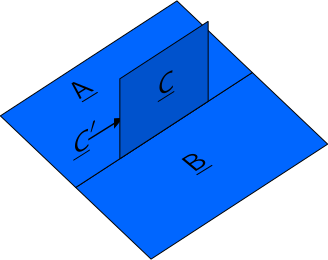
But for now, let’s just get into making 3D ERM maps. If the abstraction can easily be flattened (and then when you fold the model, you just raise the 3D parts), then the rules of 2D apply. Let’s take a look at such a case, where you want to extrude a square flap off a flat square:
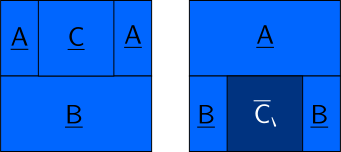
We can turn this into an ERM map, and in fact, I’ll show three:
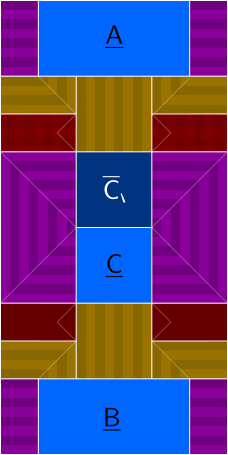
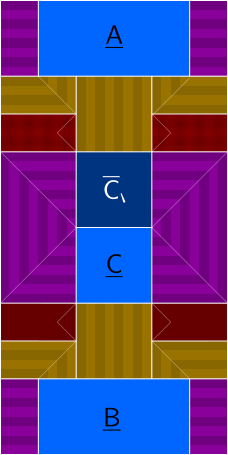
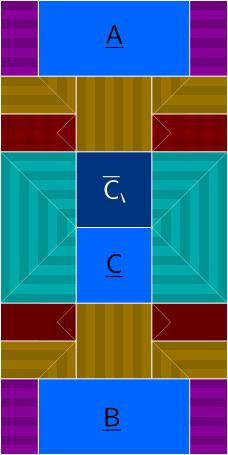
Now, we kinda want $\f{A}$ to actually be connected to $\f{B}$ around the edges of the paper here instead of having a slit, and this would also be good for illustration purposes, so let’s extend our piece of paper and the ERM map.
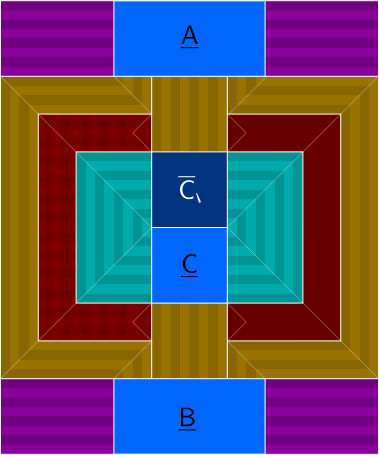
Now let’s follow the crease pattern drawing process. First, we select hidden edges, though now we have 90° hidden edges, which eventually end up with 90° creases. These follow the same overlap distance rules as 180° hidden edges unless you want waffle walls, which we don’t want in this pattern that can be folded flat. Then, we belt the lands and fill in the rivers with creases.
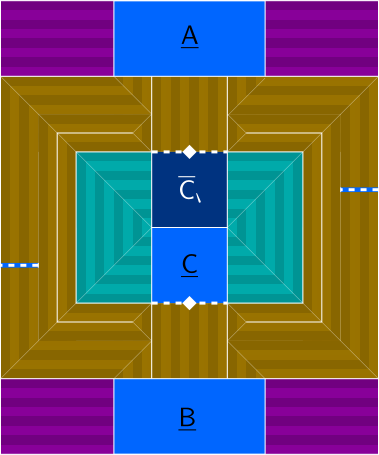
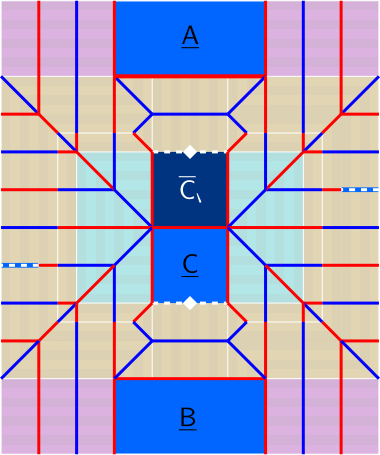
Then, we resolve incomplete vertices. Let’s first do our magic partial-erasing trick over the width-0.5 rivers (that were peninulas), and resolve easy hinges. At this point, we’ll stop showing the ERM map since it’s getting crowded.
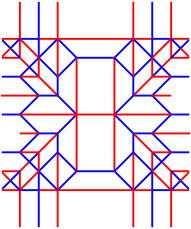
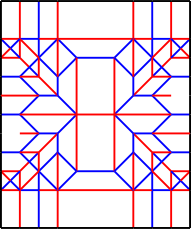
Finally, we bring in the 90° hidden edges, which need 90° creases drawn on them. If we do this, resolve the incomplete vertices that result, and remove the hanging mountains at the width-0 hidden-edge lakes, we’ll be done. You could also resolve it like a 2D map, in which case one of the 90° hidden edges becomes a proper edge with a valley crease on it, and the other one becomes a proper 0° hidden edge with no crease on it.
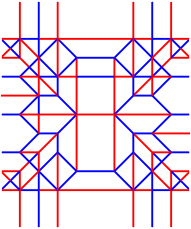
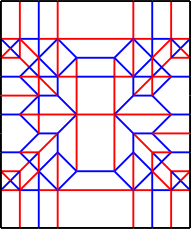
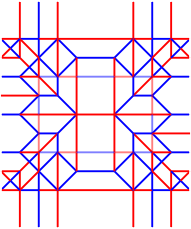
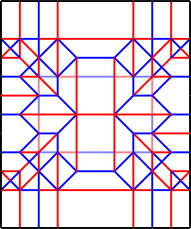
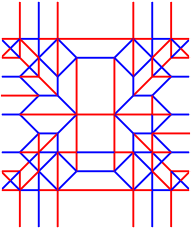
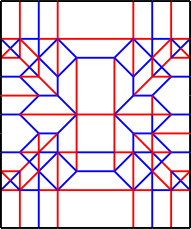
That’s the easy case. Now it’s time for the hard case, where the model can’t just be folded flat. Let’s take the 3D abstraction for a corner wall from way above in Making the Abstraction13, and draw an ERM map for it.
(Spoiler alert: this section contains a failed attempt. If you want to skip it, go to Planes).
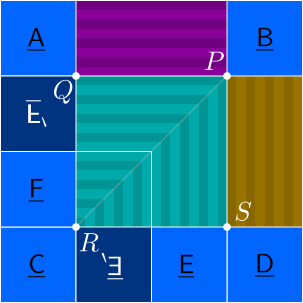
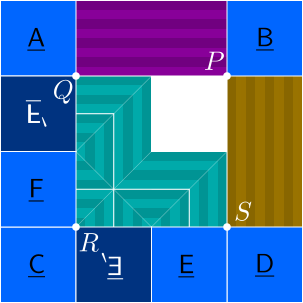
Point $P$ touches rivers from all 3 directions (X-axis, Y-axis, Z-axis), which means it’s a true 3D point and is not intended to be flat. Points $Q$, $R$, and $S$ are like this too (some of the rivers have length 0, so they’re hidden). So how would we draw a crease pattern for this? Let’s first do what we can: hidden edges, river creases, and easy-to-resolve incomplete vertices (not $P$, $Q$, $R$, or $S$, because they’re not supposed to fold flat).
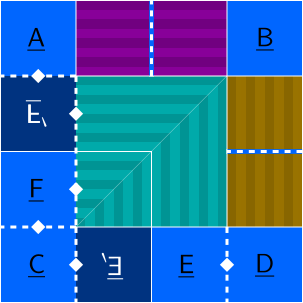
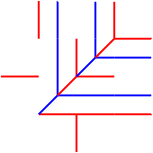
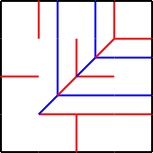
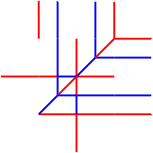
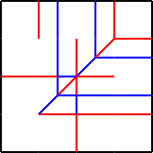
Now comes the harder part: actually drawing the 90° creases and then resolving the incomplete vertices that result from that. Importantly, the structures at $P$, $Q$, $R$, and $S$ are not intended to be flat-foldable, so don’t worry if you end up with a non-flat-foldable vertex. Here, it helps to know a few 3D box-pleated vertices. But first, let’s finish this pattern.
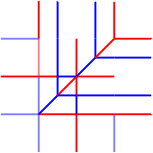
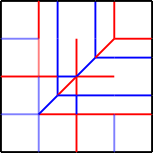
Before we could finish this pattern, point $Q$ became suspicious. Just from the creases that are there, that vertex is going to stretch the paper (it’s winded more than 360°), which indicates that we probably need to move our hidden edges. Except that the hidden edges can’t move. Most of them are fixed, and moving the width-0 ones won’t help matters. The ones on the right side of $\f{F}$ and $\f{F}’$ can move to $\f{E}$ and $\f{E}’$, but that just pushes the problem.
In fact, this ERM map is fundamentally flawed. We need to add a 90° hidden edge somewhere on the river flowing from $\f{F}$ to $\f{E}’$. But there’s only 2 places it can go, and they’re symmetric: the right side of $\f{F}$ or the top side of $\f{E}’$. Let’s add it to the right side of $\f{F}$. Then to avoid the midpoint of $\overline{QR}$ being winded more than 360°, we need to add a 90° hidden edge to the right side of $\f{F}’$. But this causes vertex $Q$ to be winded more than 360°, so we’re screwed. This abstraction is supposed to be possible without waffle walls. Luckily, there’s another ERM map we can try:
Planes
But we also need a different strategy so we don’t run into the same problem again. To do so, we can color-code the ERM map by planes. All lakes and rivers in the XY plane get a color, all lakes and rivers in the YZ plane get a color, and all lakes and rivers in the ZX plane get a color.
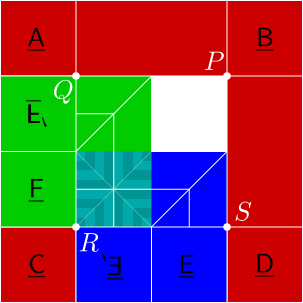
Here, red planes are XY, green planes are ZX, and blue planes are YZ14. Note that a river’s plane is determined by its target direction and its flow direction. We colored in parts of rivers where it’s clear that the flow direction is forced by the fact that vertices can’t be winded more than 360°. For example, the part of the Z-axis river to the right of $\f{F}’$ is colored green due to the problem with point $Q$ mentioned above (it can’t be red because that direction simply isn’t allowed, and it can’t be blue because it would cause either a waffle wall to appear or $Q$ to be winded more than 360°.). This leaves 2 tricky sections: the part of the Z-axis river on the lower left and the land.
Let’s start with the Z-axis river. It must all go to one plane. Now, in fact, every vertex must be winded exactly 360°, because that’s how flat paper works. Points with at most 2 plane colors are probably already winded 360°, so let’s focus on points with 3 plane colors, such as $R$. If we look at the current structure of $R$, it looks like this:
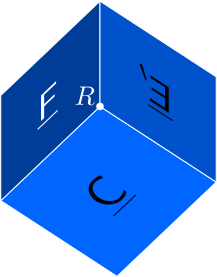
There’s only 270° so far, which leaves 90° left to shove somewhere, and the only ways to do that would be to shove it all behind $\f{F}$ or shove it all behind $\f{E}’$. The choices are symmetric, so let’s choose $\f{E}’$ and make sure we didn’t break the structure around the midpoint of $\overline{QR}$ (yes, it only has 2 plane colors, but it doesn’t hurt to check, and besides, I only said “probably”.).
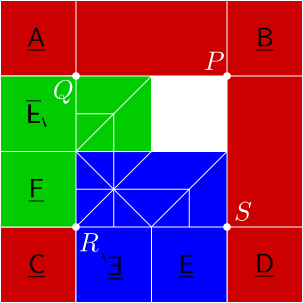

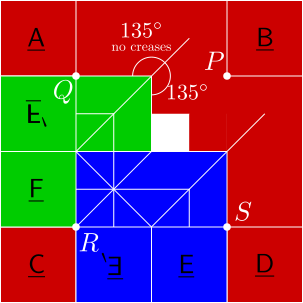
It works, so now we have to deal with that land, and to do so, we look at the midpoint of $\overline{PQ}$. We want a (0°) hidden edge on the river flowing from $\f{A}$ to $\f{B}$, and given that the flow direction of the river flowing from $\f{F}’$ is the same as the flow direction of the river flowing from $\f{A}$, this forces at least a 135° angle. Then there’s only one way to close the vertex, which is to make the rest of the land there red. A similar argument applies at the midpoint of $\overline{PS}$.
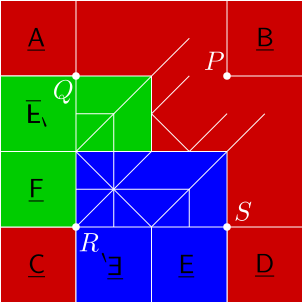
Now we just have to deal with the center point of the map. Thinking about where the rivers go, the land must be red, and the diagonal creases must go in specific places to prevent the center vertex from being winded more than 360°.
I may have went through this a little quickly, but there’s a lot of visualizing that has to go into this process, and you need to think about where hidden edges will end up at the same time, so it’s pretty involved and would take a while to explain. But now that we have a complete plane map, here’s an ERM map, complete with filled-in lands and hidden edges.
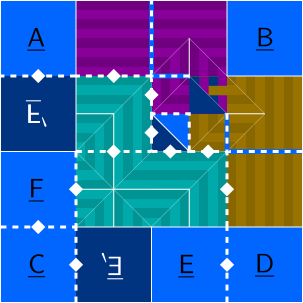
You might notice that there’s some lakes without rivers coming out of them. In box pleating (and general finite-crease origami), there’s this principle that, actually every point is either part of a lake or the boundary of a lake, and in box pleating specifically, whereever there’s a river, there’s always a perpendicular river running though it creating a perpendicular cross and thus a lake. These perpendicular rivers get reflected a lot. We don’t draw the perpendicular rivers to keep the map simple. But here, these extra lakes are formed by a perpendicular hug of perpendicular rivers, so let’s draw in the perpendicular rivers to illustrate the principle.
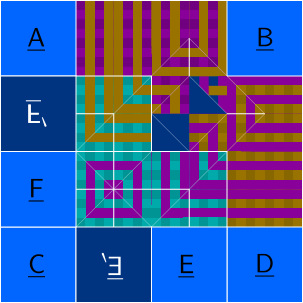
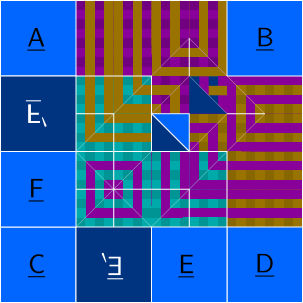
A fun fact is that the target direction of the perpendicular river is the same as the flow direction of the original river and vice versa.
Anyway, now let’s try turning this one into a crease pattern.
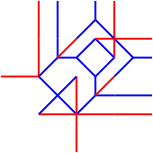
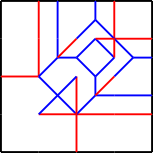
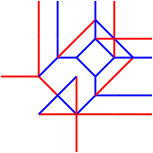
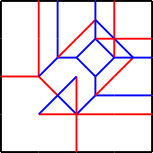
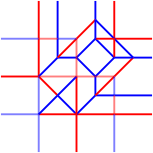
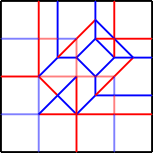
And we did it! Making a 3D model requires a lot of thinking about structure, and really making sure the points are winded 360°. And there’s often times when you want a specific layer ordering but it won’t work with the specific layout you have (thankfully we were lucky this time). If you’re beginning with ERM, I’d recommend sticking to 2D, or at least to 3D models that can be folded flat.
Profit!
We’ve made it, the final step of the ERM design process. You made an ERM map, and it’s excellent. You drew the crease pattern, and it folds flat (or into the intended 3D shape) with the correct layer ordering. This is the final step: you get out a real piece of paper, and actually fold the pattern. There are steps you can take to make the collapse easier, but that’s a topic for another post.
Summary
Now you’re ready to start designing with orthogonal box-pleated ERM! This post was long and full of pretty pictures, so here’s a summary of the process:
- Come up with an abstraction.
- All exposed lake edges should be grid-aligned.
- No holes.
- No winding vertices more than 360° unless you want waffle walls.
- Pack the abstraction into a map, forming lakes.
- The distance between two points on the paper corresponding to the same point in the abstraction should be even.
- Send a river from each lake edge and make sure it goes to the sea (paper boundary) or to a lake edge that will end up in the same place.
- Rivers are all parallel or perpendicular to each other>
- Draw a blockade map if you don’t know how constraints are satisfied in the sea.
-
If two rivers form a concavity, make sure there’s space between them. Use a peninsula as a reminder.
- Don’t forget this!
- 1 unit of separation is enough for a 90° concavity.
- For concavities with more degrees, split them and use width-0 rivers.
- Concavity-forming rivers can touch at a vertex.
- If two rivers form a convexity, they can intersect as long as distance constraints are still satisfied. If they cross, beware the river mapping!
- The parity rule of lakes applies here too.
- Perpendicular crosses become rectangle-shaped lakes.
- Perpendicular hugs become a couple of right-isosceles-triangle-shaped lakes.
- Remember the hug width rule for parallel hugs. They tend to become lakes with weird diagonal lines.
- Calculate the lakes for river overlaps.
- Do this while thinking about overlapping convexities.
- Draw a crease pattern.
- Mark hidden edges.
- Fill in rivers with axial creases.
- Resolve incomplete vertices with hinges or reverse folds.
- 3D is hard and requires a lot of visualizing.
- Profit!
- Fold it!
A nice exercise would be to take the 正 model at the very top and make it more efficient. It’s currently on a 23 grid, but perhaps it can become a 20 grid instead. (19 is impossible without a belt because then there’s simply not enough perimeter for everything to escape to the sea, and this doesn’t seem like a model that requires a belt. With 20, there’s enough perimeter, but you can only afford to let 2 units of perimeter go to waste, so maybe it’s possible, maybe it’s not.)
-
more like a thin strip, since the rivers are discretized. ↩
-
I was almost done with this post when a 3D map made me realize that distinguishing the 2 ways to color code rivers can actually be important. Oh well. ↩
-
There’s a reason why that step is emphasized. It’s the most common reason why I have to abandon a grid size and increase it. ↩
-
A blockade map helps with tracking where the rivers are supposed to go so you don’t accidentally cross rivers that shouldn’t cross. In addition, a blockade map is basically necessary if your design requires the part in question to consist entirely of middle flaps. ↩
-
At this point a certain ERM designer might say “swamp!”, but shh, this is different. ↩
-
even with Pythagorean stretches. However, partials can break this. ↩
-
which may actually just be fine, since it’s very local. ↩
-
potentially, because they’re not required if the backside lakes are explicitly drawn. ↩
-
There’s some space between the rivers in the left one for clarity. It’s not necessary, and it’s not even necessary to separate the intersection from the lake. ↩
-
maybe the transition to the parallel hug may be weird, but other than that. ↩
-
shh! ↩
-
This is fine despite that segment being in the middle of a lake, because that river’s going to be hidden. Rivers can correspond to segments in the middle of lakes. ↩
-
I’m aware that there’s a paper about folding mazes. Shh! ↩
-
You may notice that I’ve been using the secondary colors of light for river colors (a.k.a directions), so it’s only natural to use the primary colors of light for planes. ↩